Why the Kardashians have more business sense than you think

They are the family at the centre of more Entertainment news than the Royal family. In fact, they are the Royals of Hollywood – or to be specific, Calabasas, California. And they built their empire through a series of business savvy, strategic business decisions and controlled news streams. But how exactly did they do it and do they deserve more credit?

Here are 4 reasons why the Calabasas family are so darn media smart.

kardashians
Source: http://girlshideout.com/wp-content/uploads/2015/12/kardashians.jpg

  1. Controlled news messages

Each time there is a proposal, wedding announcement, new baby or even a new business venture, the news is broadcasted via one of their now numerous businesses – their TV show Keeping up with the Kardashians which is in its 11th season, their clothing lines or their individual social media accounts. They give themselves the scoop, before it hits mainstream news. Fans, media and the public are kept on tenterhooks until the news is released on their own channels. Last month the Kardashians released a series of individual mobile apps, one for each sibling, each designed and tailored with content and branded individually to each Kardashian girl. How was the app launch announced and promoted? Via the TV show and individual accounts, all cleverly cross promoted.

2. Diversifying

Khloe just announced her own TV talk show, Kocktails with Khloe. Kourtney, Khloe and Kim launched their Dash stores years ago, the youngest girls – Kendall and Kylie have their own fashion label with Forever New and Kim nearly broke the App store when she announced Kimoji – her own Emoji icons. They are involved in multiple show spin offs – Kourtney and Khloe take Miami and I am Cait with Caitlin Jenner, there are the nightclub appearances and Kim even has her own App game.

kardashian-app-launchSource: http://www.mirror.co.uk/3am/celebrity-news/kardashian-jenner-family-divided-after-6458532

3. Innovation

This year each Kardashian female released their own digital news hub, with regular tailored subscription content.

4. We can relate

No matter how rich they are, we can all relate to that sibling rivalry, sisterly fights, being embarrassed by your parents and even setting each other up on dates or simply telling each other when they are being losers.

200_s
Source: http://giphy.com/search/keeping-up-with-the-kardashian

They have built a $65million brand empire on a business model that no one else has yet mastered, as much as they are mocked by the high-brow of society, the Kardashians have shown that they have more business sense than people give them credit for. And they did it their way – the K Way.


A survival guide to starting your first blog

Ready to get blogging? Wait! Before you put pen to paper (or finger to keyboard) lets go through the steps to get your name in lights on your very own WordPress blog.

  • Choosing a name

To get started, sign up for a WordPress account. But which one should you choose? Did you know that there are two types of WordPress accounts?

What is the difference between wordpress.com and wordpress.org ?

WordPress.com
In a nutshell, wordpress.com is the free-to-use site. WordPress does all the techy stuff for you. Installation is a breeze. WordPress host your site (meaning the files are all stored on the WordPress server at no cost to you) and any automatic updates that come through can be set to automatically update on your site.

Hundreds of themes are free for you to use – you can change the look and feel of your site easily and for free or choose from a selection of premium themes for a small fee.

The downside is that you have less control – if you are not bothered about the techy stuff and just want a handy and quick way to set up a site – this is for you. Once you are set up on http://www.wordpress.com you will have your own URL with your username in the below format:

https://yourusername.wordpress.com/

Choose a username that you are happy to share with people that wish to visit your site.

You can also get a bit fancy and register your own domain at a domain registry and redirect it to this wordpress URL for your customers or blog followers. I use NetRegistry which is a local Australian domain registrar. Domains can cost anywhere from $12 a year.

ie http://www.yourURL.com which redirects to https://yourusername.wordpress.com/

Sign up to wordpress.com

WordPress.org
https://wordpress.org/ gives you control over your site.

There are tens of thousands of plugins that you can add to your site providing extra functionality. You will need to set up and install all the files yourself. Also, you will need to find a web host provider to store the files for your site. This can cost you from $5 a month to anywhere upwards of $40 a month depending on who you choose.

Find out about the full list of differences between wordpress.org and wordpress.com 

For the purposes of this example, we will assume you are using wordpress.com

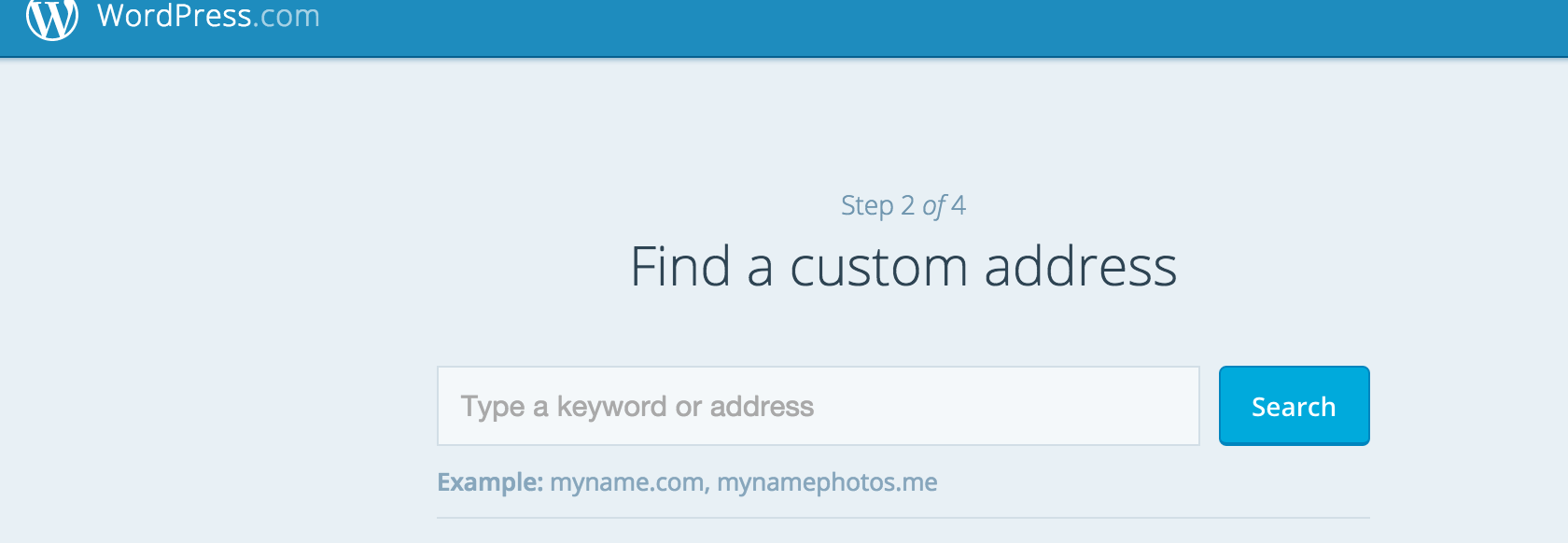
Step 1 WordPress.com

Step 2 WordPress.com

  • You have a WordPress.com username, now what?

Once you are logged in head to the dashboard of your site.

The first thing you will need to do is change the title and theme of your site.

Click on Appearance then Themes in the left toolbar.

Choose a theme and click Preview to see a preview of what your site will look like with that theme. You can change the title, navigation or header image. Once you are happy with a theme, hit Activate.

Your site or blog is now ready for you to add content to!

  • Adding content.
    Head over to the Pages section in your dashboard to Add a New Page. Before you get to this stage you should already have a plan for your site or blog. At a minimum you should have the below pages:

    • About Us
    • Contact
    • Homepage which is a given as this is the main page visitors will come to when they go to your sites URL.
    • Blog page – if your site will have a blog, this page will contain all your posts or articles. Click on Posts then Add New. This is where you can start entering in your blog content. When you are ready to publish, his the Publish button. You can even automatically set up social sharing so that your posts are automatically shared on your social networks.


5 DONTS of travelling with gadgets

1. Your ipad is NOT for taking photos on your holiday.

Yes, we know it has a camera on it – but that doesn’t mean it is for taking shots standing in front of the Leaning tower of Pisa or the Eiffel Tower, blocking the shots of everyone standing behind you. Plus, you are basically alerting any pickpocket within 50metres of you that you are:

a) a tourist

b) well-off enough to have an ipad, therefore have money.

c) not that tech savvy.

All making yourself a target for theft, or worse.

The only exception to this are the elderly or mature-aged travellers who may need the iPad to see attractions more clearly.

This must stop.

2. Hogging the powerpoints at the airport.

I get it. You forgot to charge your phone or laptop before you left the hotel. But that doesn’t mean you get to hog the powerpoint for hours while you wait for your plane to board – a 40% charge is enough, then move on so someone else can have a turn. Or better yet – buy a portable charger.

3. Say no to bum bags. To quote the TV Show ‘IT Crowd’, “Are you from the past?”

4. Don’t spend too much time taking selfies. Remember to put down the phone or camera, take a deep breath and soak in all the stimuli around you.

5. Up your Travel Insurance so it includes cover for your gadgets. There is nothing better than peace of mind when the unexpected happens.