How HootSuite can help you become a Social Media guru

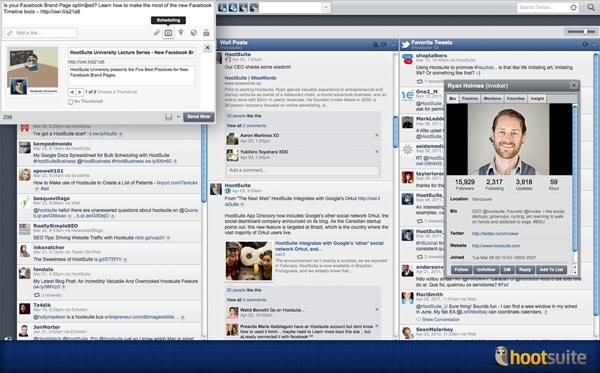
HootSuite allows you to manage all your social media channels in one dashboard. It saves time and increases productivity, and is simple to use.

How can HootSuite help you become a Social Media guru?

20130514-000143.jpg

1. Remember one login and save time.
No more signing in and out of each social network. With Hootsuite, once you do the initial connection between it and each of your networks (Twitter, Facebook, LinkedIn, YouTube) you can then simply sign in to HootSuite to post messages to all networks with a click of a button.

2. Analytics.
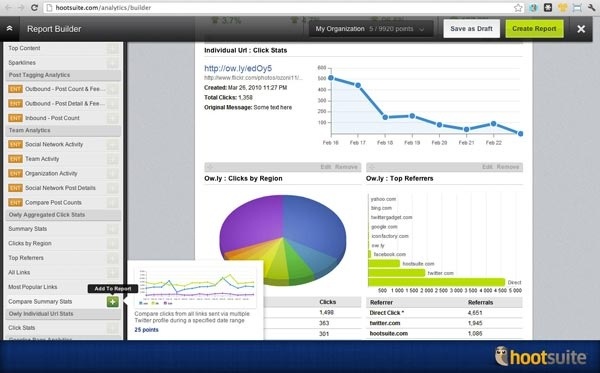
HootSuite can show you the most clicked tweets during a set period of time, you can also find out what platforms followers used, sentiments and dozens of other statistics across your networks. Reports can be customized to include your logo and scheduled so you can really impress the boss.
20130514-000420.jpg
Image source: http://media.hootsuite.com/media-kit/screen-shots/general/

3. Don’t want to hang around? Schedule your posts.
New feature called Auto schedule is now available which determines when the most effective time of day is to post and does the scheduling for you.

4. At a glance. The power of the dashboard.
Allowing you to see a stream of your mentions, what your followers are posting, messages and drilling down by adding custom streams of, say, a particular Twitter user that you would like to keep a close eye on is invaluable to any digital marketer. And it’s all on one dashboard screen. What’s more you can click on a follower or search for users to see their sample tweets, bio and Klout score.

Hootsuite is also available as iPhone or Android apps so you can use it on the run.

A new service is HootSuite University, Pro users get access to a series of the latest in social media education, delivered in short 20min webinars.

To Tweet or not to Tweet – Getting started on Twitter

Want to know more about Twitter and what all the fuss is about? Best thing to do, is just sign up and listen. Or in this case, read. By reading like minded people’s tweets you will soon find out if it is something you want to add to your daily social media consumption.

Sign up here. Choose a username, this represents your Twitter Handle which is what comes after the @ symbol and what others can look up to find and follow you. Mine is @antoninac

Twitter now contains a step by step walk through to get you started. Find people to follow by typing in names of your friends, Twitter handles if you know them or even brands that you love. News channels are also great to follow as often news stories break on Twitter BEFORE the TV news programs pick them up. Following celebrities is a popular thing to do on Twitter. Justin Bieber has more than 36 million followers. If you are a Believer of the Biebe, go for it. A host of other celebrities are on Twitter and you can preview a sample of their tweets before you choose to hit the golden Follow button.

Choose a profile picture that represents you or your brand. This will appear next to all your tweets so make sure it is easy to identify and in good taste.

Once you finish step by step set up visit your feed. This lists all the posts/tweets made by the people you follow. If you would like to share one, it is called a retweet. You can do this by hitting the Reweet button:

retweet

This automatically adds a RT at the start of your message and adds the persons Twitter handle so you are crediting that persons work. After all you can’t take credit for someone else’s tweet!

When you are ready to share a thought with the world you can post your own tweet.

compose

Hash tags are used to group similar tweets together by topic. Click on. Hash tag and a feed of all tweets will pop up. Add a hash tag which you can create simply by typing in #addyourtopic at the end of your tweet. Or look at trending topics on the left side bar of your Twitter page or under the ‘Discover’ section of the Twitter iphone app.